The Dataverse Solution Layer Trap: Why Your Managed Form Changes Disappear
The Scenario
You’re a Dataverse developer working on a CRM integration project. The system has been in production for over a year. Multiple managed solutions have been layered into target environments over time — each one carrying forms, columns, views, and workflows.
Your task: replace an old text field (crx_vendorgroupid) on the Account form with a proper lookup (crx_vendorgroup) that references a new configuration table. Clean, normalized, the way it should have been from day one.
You do everything right:
- In Dev, you add the new lookup column to the Account form
- You remove the old text field from the form
- You save, publish
- You add the form to your solution, export as managed
- You import the managed solution into Test
You open the Account form in Test. The new lookup is there. But the old text field? Still there. Staring right back at you.
You re-publish. You clear your browser cache. You check twice. It won’t go away.
What Went Wrong
Nothing. You did everything correctly. This is by design.
How Dataverse Merges Managed Solution Forms
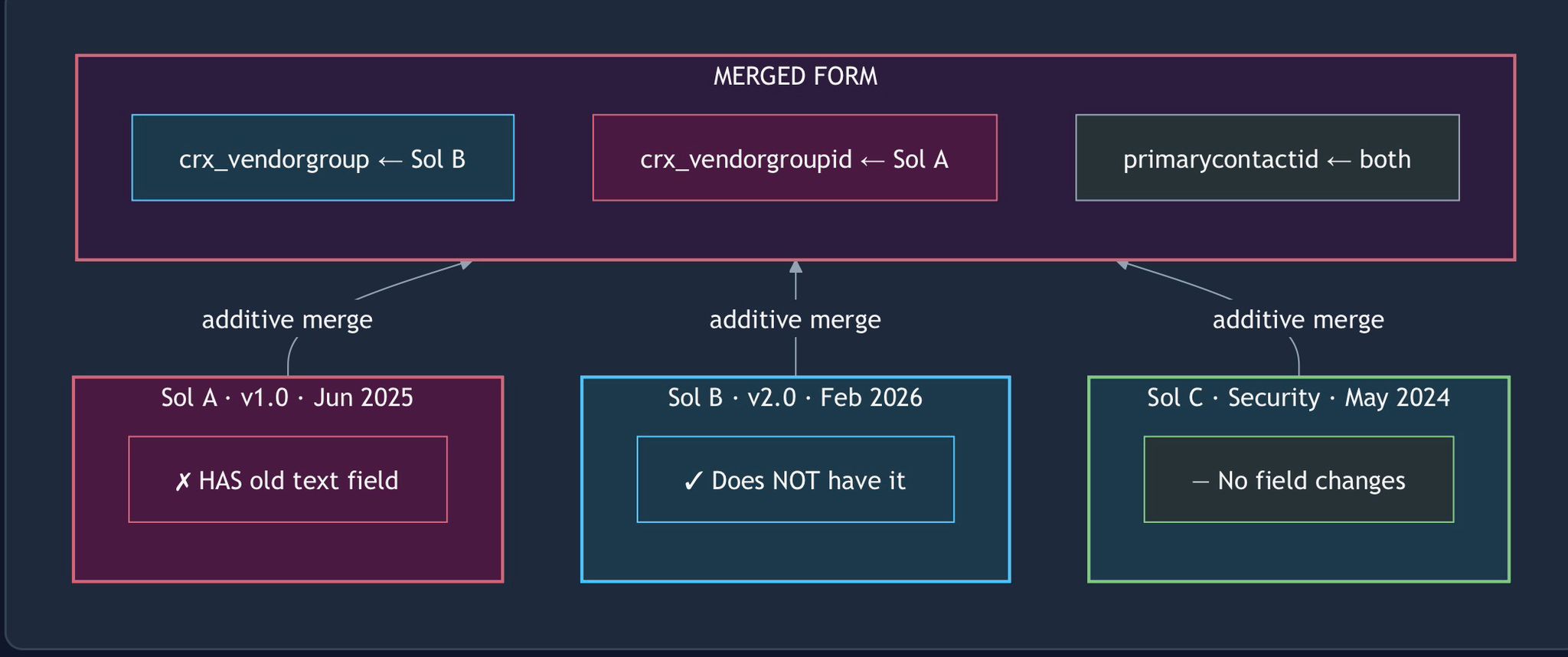
When multiple managed solutions contain the same form, Dataverse doesn’t pick a winner. It merges all layers together — and the merge is additive.
Final Form XML = Layer 1 (oldest) + Layer 2 + Layer 3 + ... + Layer N (newest)“Additive” means: if ANY layer has a control on the form, it appears in the merged result. Your newest solution removed the field from its layer, but an older solution still has it. The merge unions them all.
Here’s what was happening in the Test environment:
graph BT
    subgraph merged["MERGED FORM"]
        F1["crx_vendorgroup ← Sol B"]
        F2["crx_vendorgroupid ← Sol A"]
        F3["primarycontactid ← both"]
    end

    subgraph solA["Sol A · v1.0 · Jun 2025"]
        A1["✗ HAS old text field"]
    end

    subgraph solB["Sol B · v2.0 · Feb 2026"]
        B1["✓ Does NOT have it"]
    end

    subgraph solC["Sol C · Security · May 2024"]
        C1["— No field changes"]
    end

    solA -->|"additive merge"| merged
    solB -->|"additive merge"| merged
    solC -->|"additive merge"| merged

    style merged fill:#2d1b3d,stroke:#cf6679,stroke-width:2px,color:#f5f5f5
    style solA fill:#4a1942,stroke:#cf6679,stroke-width:2px,color:#f5f5f5
    style solB fill:#1b3a4b,stroke:#4fc3f7,stroke-width:2px,color:#f5f5f5
    style solC fill:#1b3a4b,stroke:#81c784,stroke-width:2px,color:#f5f5f5
    style F1 fill:#1b3a4b,stroke:#4fc3f7,color:#f5f5f5
    style F2 fill:#4a1942,stroke:#cf6679,color:#f5f5f5
    style F3 fill:#263238,stroke:#90a4ae,color:#f5f5f5
    style A1 fill:#4a1942,stroke:#cf6679,color:#f5f5f5
    style B1 fill:#1b3a4b,stroke:#4fc3f7,color:#f5f5f5
    style C1 fill:#263238,stroke:#81c784,color:#f5f5f5
Solution B (your latest, clean export) correctly has the form without crx_vendorgroupid. But Solution A (the older, larger solution from a previous team) still has the old form layout — including the text field. Dataverse merges both layers, and the old field reappears.
The Investigation
The tricky part is that none of this is visible at first glance. The form in Dev works perfectly. The export looks clean. The import succeeds without errors.
To diagnose, you need to look at two things:
1. Merged XML vs Managed XML
The systemform record in Dataverse has two XML fields:
| Field | What it contains |
|---|---|
formxml | The merged form XML — the final result after all solution layers are combined. This is what users see. |
formxmlmanaged | The base managed layer XML — just your solution’s contribution. |
In the failing Test environment:
formxml (merged):        73,884 chars — HAS crx_vendorgroupid
formxmlmanaged (layer):  29,428 chars — does NOT have crx_vendorgroupid
Your solution is clean. Something else is putting the field back.
2. Solution Component Inventory
Query which solutions contain the old column as a component:
Solutions containing crx_vendorgroupid attribute:
  → CorePlatform_MVP (MANAGED, v1.0, Jun 2025)    ← HERE

Solutions containing crx_vendorgroup lookup:
  → PlatformEnhancements (MANAGED, v2.0, Feb 2026) ← Your solution
The old solution still owns the old column — and its form layer still has it on the form.
Why This Happens
This situation is almost inevitable in any Dataverse project that:
- Evolves over time — early solutions carry form layouts that later solutions want to change
- Has multiple solution publishers — security roles, core platform, feature releases, each touching the same forms
- Uses managed solutions in target environments — which is the recommended practice
The longer a project runs, the more managed solution layers accumulate on key forms like Account, Contact, and Opportunity. Each layer contributes controls, and the merge only grows.
The Progression
graph TB
    subgraph row1[" "]
        direction LR
        subgraph m1["  Month 1  "]
            M1["Solution A deploys Account form<br/>✅ 10 fields on form"]
        end
        subgraph m4["  Month 4  "]
            M4["Solution B adds 3 fields<br/>✅ 13 fields on form"]
        end
        subgraph m8["  Month 8  "]
            M8["Solution C adds security fields<br/>✅ 15 fields on form"]
        end
        m1 --> m4 --> m8
    end

    subgraph row2[" "]
        direction LR
        subgraph m12["  Month 12 — The Problem  "]
            M12A["Solution D replaces 2 fields with lookups"]
            M12B["Removes old fields from its layer"]
            M12C["But Solutions A, B, C still have them"]
            M12D["Merged form: 17 fields — not 15!"]
            M12A --> M12B --> M12C --> M12D
        end
    end

    m8 --> m12

    style row1 fill:none,stroke:none
    style row2 fill:none,stroke:none
    style m1 fill:#1b3a4b,stroke:#4fc3f7,stroke-width:2px,color:#f5f5f5
    style m4 fill:#1b3a4b,stroke:#4fc3f7,stroke-width:2px,color:#f5f5f5
    style m8 fill:#1b3a4b,stroke:#81c784,stroke-width:2px,color:#f5f5f5
    style m12 fill:#4a1942,stroke:#cf6679,stroke-width:2px,color:#f5f5f5
    style M1 fill:#263238,stroke:#4fc3f7,color:#f5f5f5
    style M4 fill:#263238,stroke:#4fc3f7,color:#f5f5f5
    style M8 fill:#263238,stroke:#81c784,color:#f5f5f5
    style M12A fill:#2d1b3d,stroke:#cf6679,color:#f5f5f5
    style M12B fill:#2d1b3d,stroke:#cf6679,color:#f5f5f5
    style M12C fill:#4a1942,stroke:#cf6679,color:#f5f5f5
    style M12D fill:#4a1942,stroke:#e94560,color:#fff,stroke-width:3px
Every refactoring that replaces or removes a field hits this wall.
The Fix
You have three options, each with different trade-offs:
Option 1: Manual Override (Quick, Per-Environment)
Open the form in the target environment (Test, UAT, Prod), manually remove the field, save, and publish. This creates an Active (unmanaged) customization layer that takes precedence over all managed layers.
| Pro | Con |
|---|---|
| 30-second fix | Must repeat per environment |
| Zero risk to solutions | Creates unmanaged customizations (some orgs discourage this) |
| Immediate | Doesn’t travel with solution exports |
Option 2: Hide via Your Solution (Recommended)
Instead of removing the field from your solution’s form, add it back but set it to hidden (visible = false). When the same control exists in multiple layers, the highest-priority layer’s properties win.
graph LR
    subgraph old["  Solution A ·  older  "]
        OV["crx_vendorgroupid<br/>visible = true"]
    end

    subgraph new["  Solution B ·  newer, higher priority  "]
        NV["crx_vendorgroupid<br/>visible = false"]
    end

    subgraph result["  Merged Result  "]
        RV["crx_vendorgroupid<br/>visible = false  ✓"]
    end

    old -->|"property merge"| result
    new -->|"wins"| result

    style old fill:#4a1942,stroke:#cf6679,stroke-width:2px,color:#f5f5f5
    style new fill:#1b3a4b,stroke:#4fc3f7,stroke-width:2px,color:#f5f5f5
    style result fill:#1a3a2a,stroke:#81c784,stroke-width:2px,color:#f5f5f5
    style OV fill:#4a1942,stroke:#cf6679,color:#f5f5f5
    style NV fill:#1b3a4b,stroke:#4fc3f7,color:#f5f5f5
style RV fill:#1a3a2a,stroke:#81c784,color:#f5f5f5| Pro | Con |
|---|---|
| Travels with the solution | Field is still technically on the form (just hidden) |
| Works across all environments on import | Requires understanding of the layering issue |
| No manual steps per environment | Minor maintenance debt |
This is the pragmatic fix — you can’t remove what another solution contributes, but you can override its properties.
The Cell ID Trap (Why “Just Hide It” Can Fail)
If you try this and the field is still visible in the target environment, you’ve likely hit the next layer of the problem: cell GUID mismatch.
Every control on a Dataverse form lives inside a <cell> element, and every cell has a unique GUID:
<cell id="{4cf1a254-03b6-4c33-8355-60dc2d2290d3}" visible="true">
    <control id="crx_vendorgroupid" datafieldname="crx_vendorgroupid" />
</cell>
When you add a field back to the form in Dev using the form designer, Dataverse generates a new cell GUID. Your solution’s form layer now carries the field in a different cell than the old solution’s layer:
graph TB
    subgraph problem["  The Problem — Different Cell GUIDs  "]
        direction LR
        subgraph solA2["  Solution A ·  older  "]
            CA["cell {4cf1a254...}<br/>visible = true<br/>crx_vendorgroupid"]
        end
        subgraph solB2["  Solution B ·  newer  "]
            CB["cell {42e8ce66...}<br/>visible = false<br/>crx_vendorgroupid"]
        end
        subgraph merged2["  Merged Result  "]
            MA["cell {4cf1a254...}<br/>visible = true  ✗"]
            MB["cell {42e8ce66...}<br/>visible = false"]
        end
        solA2 -->|"different GUIDs"| merged2
        solB2 -->|"both included"| merged2
    end

    subgraph fix["  The Fix — Matching Cell GUIDs  "]
        direction LR
        subgraph solA3["  Solution A ·  older  "]
            CA2["cell {4cf1a254...}<br/>visible = true<br/>crx_vendorgroupid"]
        end
        subgraph solB3["  Solution B ·  newer  "]
            CB2["cell {4cf1a254...}<br/>visible = false<br/>crx_vendorgroupid"]
        end
        subgraph merged3["  Merged Result  "]
            MC["cell {4cf1a254...}<br/>visible = false  ✓"]
        end
        solA3 -->|"same GUID"| merged3
        solB3 -->|"property wins"| merged3
    end

    style problem fill:none,stroke:#cf6679,stroke-width:2px,color:#f5f5f5
    style fix fill:none,stroke:#81c784,stroke-width:2px,color:#f5f5f5
    style solA2 fill:#4a1942,stroke:#cf6679,stroke-width:2px,color:#f5f5f5
    style solB2 fill:#1b3a4b,stroke:#4fc3f7,stroke-width:2px,color:#f5f5f5
    style merged2 fill:#2d1b3d,stroke:#cf6679,stroke-width:2px,color:#f5f5f5
    style solA3 fill:#4a1942,stroke:#cf6679,stroke-width:2px,color:#f5f5f5
    style solB3 fill:#1b3a4b,stroke:#4fc3f7,stroke-width:2px,color:#f5f5f5
    style merged3 fill:#1a3a2a,stroke:#81c784,stroke-width:2px,color:#f5f5f5
    style CA fill:#4a1942,stroke:#cf6679,color:#f5f5f5
    style CB fill:#1b3a4b,stroke:#4fc3f7,color:#f5f5f5
    style MA fill:#4a1942,stroke:#e94560,color:#f5f5f5,stroke-width:3px
    style MB fill:#263238,stroke:#90a4ae,color:#f5f5f5
    style CA2 fill:#4a1942,stroke:#cf6679,color:#f5f5f5
    style CB2 fill:#1b3a4b,stroke:#4fc3f7,color:#f5f5f5
    style MC fill:#1a3a2a,stroke:#81c784,color:#f5f5f5,stroke-width:3px
Dataverse merges cells by their GUID. Different GUIDs = different cells = both appear. Your hidden cell is there, but the old visible one is too. The field shows up because the old cell still has visible = true.
How to fix the cell GUID
The form designer won’t let you choose a cell’s GUID. You need to edit the form XML directly:
-
Find the old cell GUID — Query
formxmlin the target environment and look for the<cell>containing your field. Note itsidattribute. -
Update Dev’s form XML — Use the Dataverse API to PATCH the
systemformrecord in Dev, replacing the cell GUID with the one from the old solution:
PATCH /api/data/v9.2/systemforms({form-guid})
{ "formxml": "<updated XML with old cell GUID>" }- Publish, re-export, reimport — Now your managed solution carries the field in a cell with the same GUID as the old solution. The merge sees one cell, two layers — your
visible = falsewins.
You can verify the fix by inspecting the exported customizations.xml — look for your field’s <cell> and confirm the id matches the old solution’s cell GUID.
Option 3: Update the Old Solution (Proper, Risky)
Re-export the old solution (Solution A) from Dev — where the field has already been removed from the form — as a new managed version, and reimport it into target environments.
| Pro | Con |
|---|---|
| Fixes the root cause | Old solution may have hundreds of components |
| Clean solution layers | Risk of unintended changes if Dev has drifted |
| No hidden fields | Requires access to original solution source |
Option 4: Migrate and Uninstall (Long-term)
Migrate all components from the old solution into your new solution, then uninstall the old one.
| Pro | Con |
|---|---|
| Eliminates the problem permanently | Major undertaking (hundreds of components) |
| Reduces solution debt | Risk of breaking dependencies |
| Clean environment | Needs thorough testing |
Prevention: What You Can Do Today
1. Minimize Form Overlap
Keep forms in as few solutions as possible. If CorePlatform owns the Account form, don’t also add it to SecurityRoles, FeatureRelease, and HotfixBundle. Every solution that touches a form creates a merge layer.
2. Use a Single “Form Owner” Solution
Designate one solution as the owner of each major form. Other solutions can add columns to the table but should not include the form. Only the owner solution modifies the form layout.
3. Document Solution Component Ownership
Maintain a matrix of which solution owns which forms, views, and dashboards. When onboarding new team members, this prevents accidental duplication.
4. Plan for Field Replacement
When you know you’re replacing a field (text → lookup, single field → composite), plan the form change to include the hide pattern (Option 2) from the start. Don’t assume removal will propagate.
5. Audit Before Import
Before importing a managed solution that modifies forms, check which other managed solutions in the target environment touch the same forms:
GET /api/data/v9.2/solutioncomponents
  ?$filter=objectid eq {form-guid} and componenttype eq 60
  &$expand=solutionid($select=uniquename,friendlyname,version)
If multiple solutions own the form, expect merge behavior.
6. Mark Deprecated Columns Clearly
When you hide a deprecated field on a form, also rename its display name to something unmistakable:
crx_vendorgroupid → "ZZZ - Do NOT Use - Vendor Group ID"The ZZZ prefix pushes it to the bottom of any alphabetical column picker, and the label makes it obvious to anyone browsing the form designer or column list that this field is dead. If the hide ever fails or someone accidentally re-adds it, the label screams “don’t touch.” It’s a cheap safety net that costs nothing and saves future confusion.
The Diagnostic Flow
flowchart TD
    A["Field still visible after<br/>managed solution import"] --> B{"Check formxml vs<br/>formxmlmanaged"}
    B -->|"Field in formxml<br/>but NOT in formxmlmanaged"| C["Another solution layer<br/>is contributing it"]
    B -->|"Field in BOTH"| D["Your solution still<br/>has the field — re-export"]
    B -->|"Field in NEITHER"| E["Clear browser cache<br/>and publish all"]
    C --> F{"Query solutioncomponents<br/>for the form"}
    F --> G["Identify which managed<br/>solutions contain the form"]
    G --> H{"How many solutions<br/>own this form?"}
    H -->|"Multiple"| I["Hide field in your solution<br/>with visible = false"]
    I --> L{"Still visible<br/>after reimport?"}
    L -->|"No"| M["Done ✓"]
    L -->|"Yes"| N["Cell GUID mismatch!<br/>Your cell has a different ID<br/>than the old solution's cell"]
    N --> O["Find old cell GUID in<br/>target environment's formxml"]
    O --> P["PATCH Dev form XML<br/>to use the old cell GUID"]
    P --> Q["Re-export managed<br/>and reimport"]
    Q --> M
    H -->|"Only yours"| K["Check for Active<br/>customization layer"]

    style A fill:#4a1942,stroke:#cf6679,stroke-width:3px,color:#f5f5f5
    style B fill:#263238,stroke:#90a4ae,stroke-width:2px,color:#f5f5f5
    style C fill:#2d1b3d,stroke:#cf6679,stroke-width:2px,color:#f5f5f5
    style D fill:#1b3a4b,stroke:#4fc3f7,stroke-width:2px,color:#f5f5f5
    style E fill:#1b3a4b,stroke:#4fc3f7,stroke-width:2px,color:#f5f5f5
    style F fill:#263238,stroke:#90a4ae,stroke-width:2px,color:#f5f5f5
    style G fill:#263238,stroke:#90a4ae,stroke-width:2px,color:#f5f5f5
    style H fill:#263238,stroke:#90a4ae,stroke-width:2px,color:#f5f5f5
    style I fill:#1b3a4b,stroke:#4fc3f7,stroke-width:2px,color:#f5f5f5
    style K fill:#1b3a4b,stroke:#e94560,stroke-width:2px,color:#f5f5f5
    style L fill:#263238,stroke:#90a4ae,stroke-width:2px,color:#f5f5f5
    style M fill:#1a3a2a,stroke:#81c784,stroke-width:3px,color:#f5f5f5
    style N fill:#4a1942,stroke:#e94560,stroke-width:3px,color:#f5f5f5
    style O fill:#2d1b3d,stroke:#cf6679,stroke-width:2px,color:#f5f5f5
    style P fill:#1b3a4b,stroke:#4fc3f7,stroke-width:2px,color:#f5f5f5
    style Q fill:#1b3a4b,stroke:#4fc3f7,stroke-width:2px,color:#f5f5f5
The Bigger Picture
This isn’t a bug — it’s a consequence of Dataverse’s design philosophy: managed solutions are additive, not destructive. Microsoft designed it this way to prevent one solution from accidentally breaking another. But the side effect is that removing things from managed solutions is fundamentally harder than adding them.
The longer a Dataverse project runs and the more solutions accumulate, the more this matters. It’s the kind of issue that doesn’t surface in greenfield deployments but becomes a recurring challenge in mature environments with multiple solution publishers, multiple release trains, and years of accumulated customizations.
Understanding the merge behavior — and planning for it — is the difference between a smooth deployment and a puzzling “I removed it, why is it still there?” investigation.
If you’ve hit this wall before, I’d love to hear how you solved it. Drop a comment or DM.